Clean Entire Folders of PDFs
Apply the same privacy-cleaning workflow to dozens or hundreds of PDFs locally in your browser.
Test mode — no real charge. Use a Dodo test card (e.g. 4242 4242 4242 4242).
$29 once
One-time purchase. No monthly subscription. Lifetime access.
Buy PDFSanitize Pro — $29Secure checkout by Dodo Payments. Your license key is emailed to you and the app opens as soon as payment completes.
7-day refund, no questions asked. See the Refund Policy.
Already have a license? Activate it or open the app.
Or check a PDF freeSee inside PDFSanitize Pro
These are real screenshots of the app, cleaning six sample PDFs in the browser.
Add a batch or a whole folder
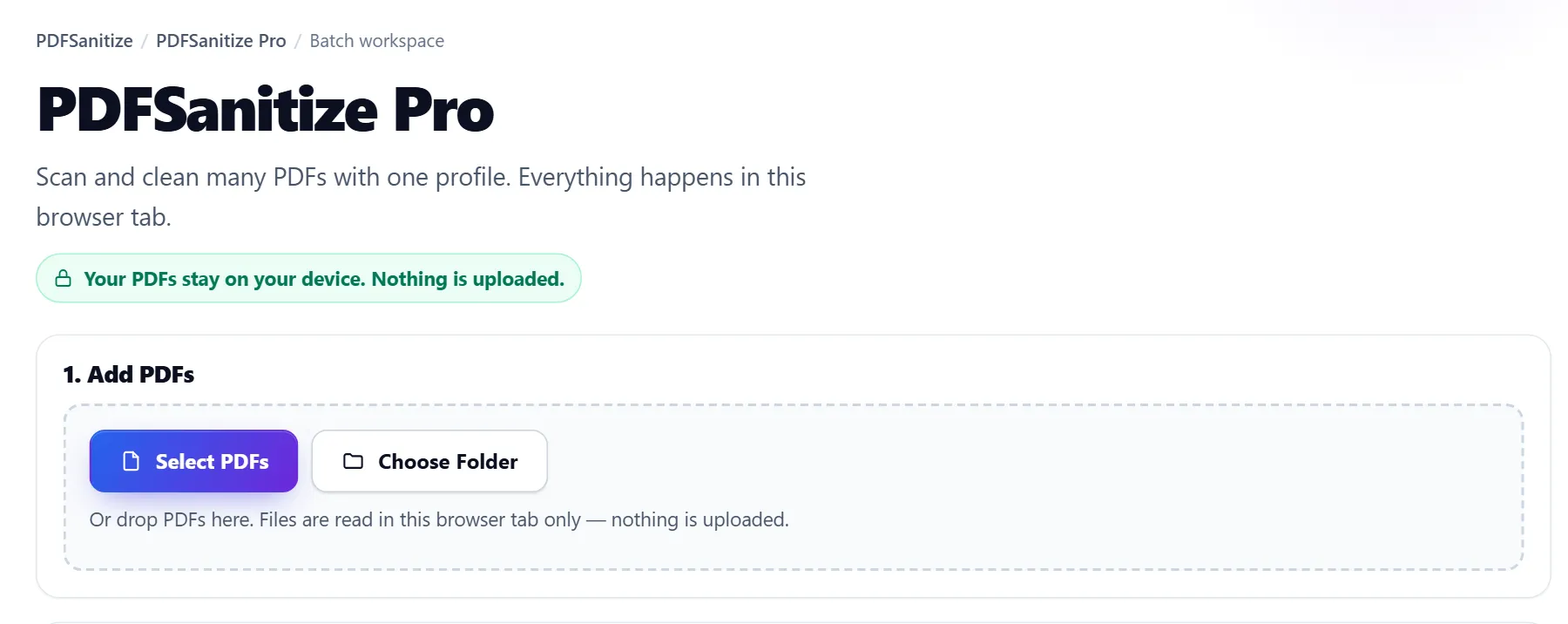
Select many PDFs at once, choose a folder in browsers that support it, or drop files on the page. Pick what to remove
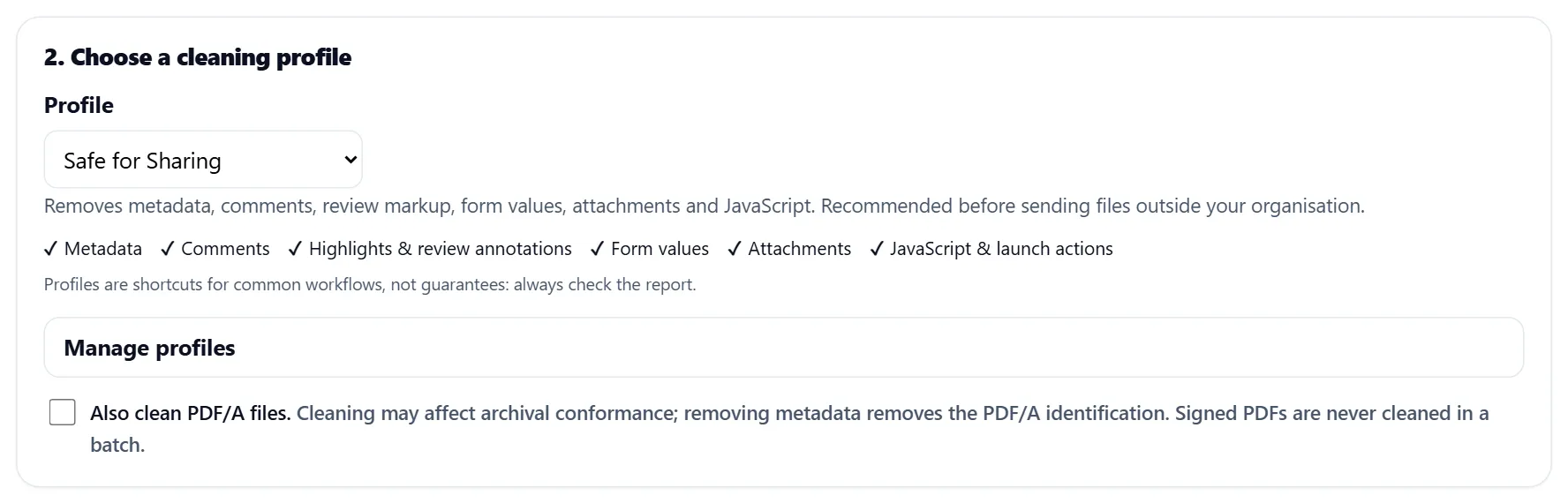
Built-in profiles like Safe for Sharing, Metadata Only and Remove Review Markup, or save your own. Clean, check and download
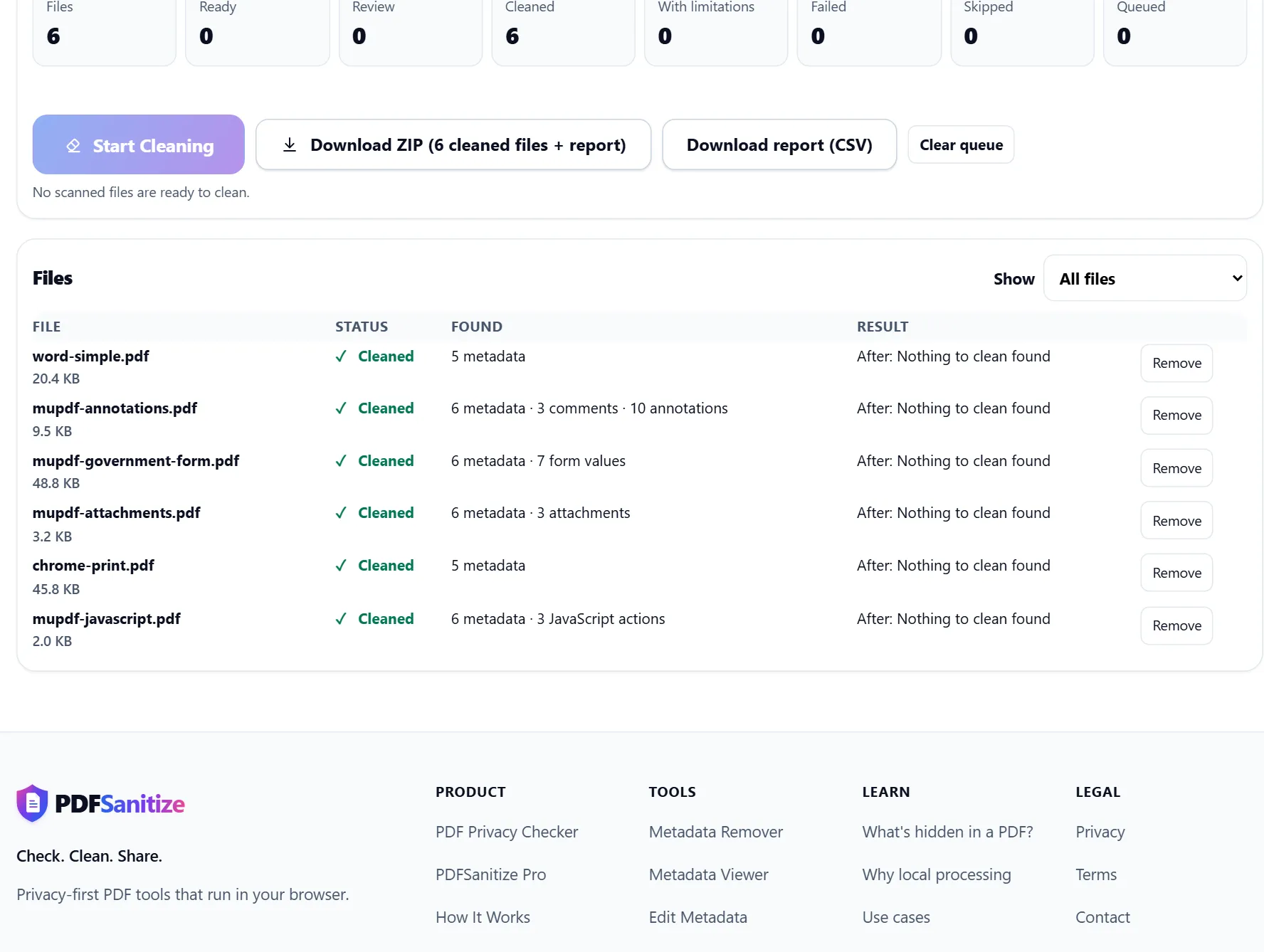
Every file is cleaned and re-checked. Download all of them as one ZIP with a CSV report.
Step-by-step instructions are in the help guide.
Activate your license
Paste the license key from your welcome email to use PDFSanitize Pro in this browser. Do this again on another browser or device, or if your browser data was cleared.
Forgot your license key?
Enter the email you used at checkout and we'll email your license key to you.
Still stuck, or no email arrived? Contact us and we'll help.
Free vs Pro: scale, not privacy
The free tools are complete and stay free. Pro adds the workflow for many files at once, using the same cleaning engines.
Free
- One PDF at a time
- Every single-file tool: metadata, comments, annotations, forms, attachments, JavaScript, flattening, redaction
- No account
- No upload
PDFSanitize Pro
- Batch and folder workflows
- Saved cleaning profiles
- Per-file results, with review for signed and PDF/A files
- Batch report (CSV)
- One ZIP of cleaned files
- Progress queue with Stop
- Lifetime access — one-time purchase
How PDFSanitize Pro works
- Select PDFs, or a whole folder in browsers that support it.
- Every file is scanned with the same engine as the free PDF Privacy Checker.
- Choose a cleaning profile, such as Safe for Sharing, Metadata Only or Remove Review Markup, or save your own.
- Files are cleaned two at a time in the background. Each result is re-checked, and anything that couldn't be cleaned is listed.
- Download one ZIP with the cleaned files and a CSV report.
Pro uses the same cleaning as the free Remove PDF Metadata, Remove Comments From PDF, Remove Annotations From PDF, Clear PDF Form Fields, Remove PDF Attachments and Remove JavaScript From PDF tools, applied to every file at once.
Signed PDFs are never cleaned in a batch, and PDF/A files are only cleaned if you include them. Profiles are shortcuts for common workflows, not guarantees — the report shows exactly what was found and removed for each file.
FAQ
PDFSanitize Pro FAQ
What Pro does, and what it doesn't.
How do I get PDFSanitize Pro?
Buy it once for $29 through the secure Dodo Payments checkout. Your license key is emailed to you, and the app opens in your browser as soon as the payment completes. To use it in another browser, paste your key in the Activate your license section.
Will my PDFs be uploaded?
No. Like the free tools, PDFSanitize Pro reads and cleans files in your browser tab. Files, file names and results aren't uploaded or stored; only your cleaning profile settings are saved in the browser.
What will PDFSanitize Pro clean?
The same things as the free tools, for many files at once: metadata, comments, highlights and other review annotations, form values, embedded attachments, and JavaScript or launch actions. You choose which with a cleaning profile.
What about signed PDFs and PDF/A files?
Signed PDFs are never cleaned in a batch, because cleaning invalidates the signature; they're listed for review so you can handle them one at a time. PDF/A files are also listed for review and only cleaned if you choose to include them.
Does PDFSanitize Pro redact or flatten PDFs?
No. Redaction needs you to mark each area by hand, so it stays a single-document tool. Flattening isn't part of batch cleaning either.
I lost my license key. What do I do?
Use "Forgot your license key?" on this page: enter the email you used at checkout and we'll email the key to you again.
Can I get a refund?
Yes. You can ask for a full refund within 7 days of purchase, for any reason, using the contact form. Dodo Payments returns the money to your original payment method, and the license key for that order is disabled. The Refund Policy has the details.
Do the free tools stay free?
Yes. Every single-file tool stays free, with no account and no upload. PDFSanitize Pro is about scale — folders and batches — not about privacy features.